跳转至

Rime中州韵输入法+Rime-ice雾凇方案保存英文自造词

Rime中州韵输入法安装及Rime-ice雾凇方案配置

使用中如何保存英文自造词,方便以后输入

Example

适用于多个系统的发行版,以Windows系统Weasel小狼毫前端为例

  1. 右键,打开 用户文件夹
  2. 新建 custom_en.dict.yaml 词库文件用来保存用户自造词,输入以下内容,建议放在新建目录 dist 下(默认git ignore)
    custom_en.dict.yaml
    1
    2
    3
    4
    5
    ---
    name: custom_en
    version: "2026-1-26"
    sort: by_weight
    ...
    
  3. 下载custom_en.lua文件,保存到 lua 文件夹下

    点击展开custom_en.lua脚本内容
    custom_en.lua
    local function user_dict_exists_(str,dir)
      local file = io.open(dir, "r")
      for line in file:lines() do
        if line == str then
        file:close()
        return true
        end
      end
      file:close()
      return false
    end
    
    local function custom_en(input, seg, env)
      if (string.sub(input, -1) == "_") then
        local inpu = string.gsub(input, "[_]+$", "")
        local unconfirm = inpu .. "\t" .. inpu:gsub("[^%a]+",""):lower() .. "\t100000"
        if (string.len(inpu) > 1 and string.sub(input, 1, 1) ~= "_") then
          -- 根据自己的操作系统以及自造词库文件保存路径修改以下两行,--为lua注释符号
          path = "D:\\Rime\\dist\\custom_en.dict.yaml"   -- for Windows users
          -- path = "/Users/xxx/Rime/dist/custom_en.dict.yaml"   -- for Linux or Mac users
          if(user_dict_exists_(unconfirm,path))then
            local file = io.open(path, "r+")
            local content = file:read("*all")
            file:close()
            if (string.sub(input, -2) == "__") then
              content = content:gsub("\n" .. unconfirm:gsub("([%%%(%)%[%]%-*+?%.%^])", "%%%1"), "")
              file = io.open(path, "w+")
              file:write(content)
              file:close()
              yield(Candidate("pin", seg.start, seg._end, inpu," 已删除 输入__可重新添加"))
            else
              yield(Candidate("pin", seg.start, seg._end, inpu, " _删除"))
            end
          else
            if (string.sub(input, -2) == "__") then
              local file = io.open(path, "a")
              file:write("\n" .. unconfirm)
              file:close()
              yield(Candidate("pin", seg.start, seg._end, inpu, " 已保存为用户词"))
            else
              yield(Candidate("pin", seg.start, seg._end, inpu, " _保存"))
            end
          end
        end
      end
    end
    
    return custom_en
    
  4. 修改 melt_eng.dict.yaml 引入自造词库,注意使用空格缩进而非 Tab

    melt_eng.dict.yaml新增行
    1
    2
    3
    4
    5
    6
    name: melt_eng
    version: "2023-05-09"
    import_tables:
      - en_dicts/en_ext # 补充(里面有些许带权重的,且和 en 重复,需要把 en_ext 放在上面)
      - en_dicts/en     # 英文主词库
    + - dist/custom_en      # 英文用户自造词
    

  5. 在输入方案 patch 文件中引入 lua 函数。

    • 全拼方案对应 rime_ice.custom.yaml ,双拼方案对应 double_pinyin.custom.yaml等。
    • 以全拼为例,在patch文件 rime_ice.custom.yaml 中新增一行,引入lua函数
    rime_ice.custom.yaml新增行
    patch:
      # lua translator 添加
      engine/translators:
        - punct_translator
        - script_translator
        - lua_translator@*date_translator    # 时间、日期、星期
        - lua_translator@*lunar              # 农历
        - lua_translator@*uuid               # UUID
        - table_translator@custom_phrase     # 自定义短语 custom_phrase.txt
        - table_translator@melt_eng          # 英文输入
        - table_translator@cn_en             # 中英混合词汇
        - table_translator@radical_lookup    # 部件拆字反查
        - lua_translator@*unicode            # Unicode
        - lua_translator@*number_translator  # 数字、金额大写
        - lua_translator@*calc_translator    # 计算器
        - lua_translator@*force_gc           # 暴力 GC
    +   - lua_translator@*custom_en          # 自定义英文自造词词库
    
  6. 右键-重新部署

使用方式

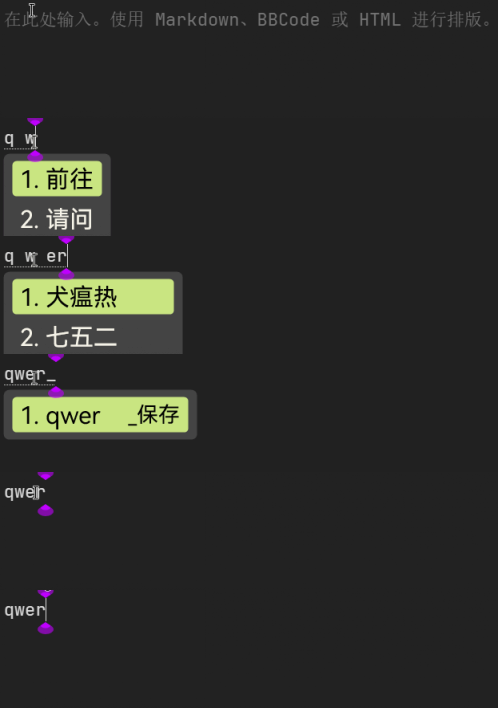
  • 输入词库中不存在的英文单词时,按下 _ 提示 _保存,再次按下 _ 将该词保存为用户词,成功后提示 已保存为用户词
    • 编码默认为全小写

20260126_175405_screenshots|498x118

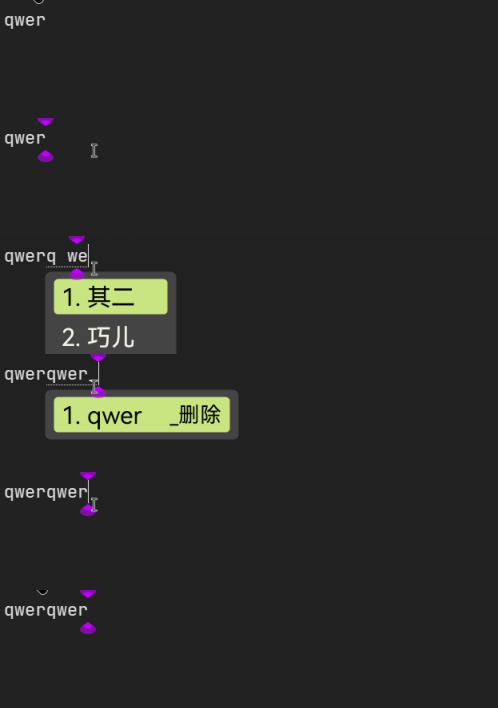
  • 输入英文单词,按下 _ 后如果检测到用户词库中已存在改词,提示 _删除,再次按下 _ 将该词从用户词库中移除,成功后提示 已删除 输入__可重新添加

20260126_175512_screenshots|498x118

注意事项

  • 自造词文件路径采用硬编码
  • 每次保存/删除自造词后,需要重新部署才能生效
  • 需保证Rime前端提供的 librime 版本 ≥ 1.8.5 且含有 librime-lua 依赖
  • 需保证所采用方案允许 _ 上屏,如默认不允许,则需要自定义 default.custom.yaml,雾凇方案默认允许 _ 上屏
default.custom.yaml修改内容
1
2
3
patch:
  recognizer/patterns/+:
    underscore: "^[A-Za-z]+_.*"  # 下划线不上屏

参考

See Also

Original Post | LINUX DO